Did you know that the first ever org chart was created in the mid-1800s for the Erie Railroad company? In the midst of the Industrial Revolution, new organizations were being formed and growing and a new way of managing this, especially at scale was needed. The railroad was at the center of expansion, and without an org chart, as its size and breadth of operations expanded, the disorganization became a serious impediment. So Brigadier General Daniel McCallum, an Erie Railroad company executive, devised the first one.
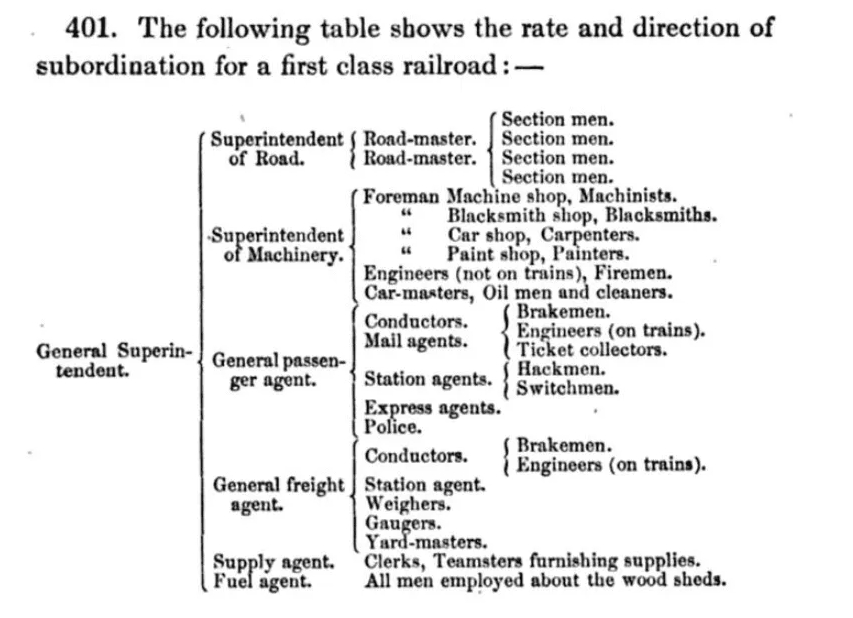
Original org chart
We are in the midst of another seismic shift, this time spurred by AI, and it is precisely this that is causing us to relook at the org chart. Does what served us reasonably well for the past 170 years hold up now? A part of that is how does AI show up in the org chart (and what does that even mean)?
As AI becomes more ubiquitous across organizations, the edges around decision-making and accountability are beginning to blur. AI systems are starting to shape decisions but haven’t been explicitly granted decision-making authority and often there is a lack of clear accountability. AI is operating in the shadows here and all this happening at machine speed.
This creates risks because the system of checks and balances is getting usurped. A prompt written for an agent, whose output then materially influences a decision sort of becomes the new operating policy but it has never been reviewed in the same way other operating policies are reviewed. The scale of the systems here is also problematic. One flawed output can scale rapidly given the speed and breadth that AI operates and if things go wrong, there is a very blurry line on who (or what) is accountable.
To start to put some structure around this, it is critical to think through defining the role(s) of AI in the org chart and then represent them accordingly. After all, the org chart is a good way to see authority and accountability lines. One useful starting point is to define five roles:
| Role | Function | Human control |
|---|---|---|
| Observer | Monitors activity, detects patterns, and raises alerts. | Humans determine whether to respond. |
| Advisor | Recommends actions or decisions. | Humans decide and act. |
| Operator | Executes bounded, predefined workflows. | Humans define and review the workflow. |
| Delegate | Makes limited decisions or communicates within explicit guardrails. | Humans retain accountability and handle exceptions. |
| Orchestrator | Coordinates agents, systems, or people toward an outcome. | Humans define objectives, boundaries, and escalation paths. |
The progression is essentially an authority ladder: observe → recommend → execute → decide → coordinate.
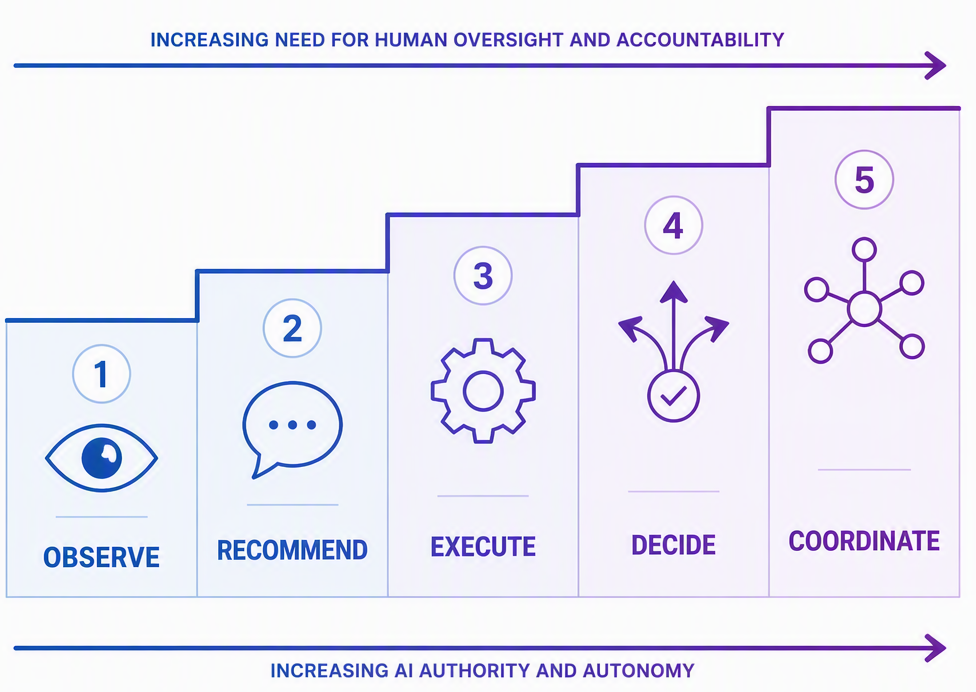
AI Authority Ladder
Conway’s Law holds that organizations design systems that mirror their internal communication structures. Adding AI into the mix will eventually change both the organization and what it produces. Leaders need to architect human–AI communication deliberately: defining who receives an AI recommendation, who may act on it, how decisions are challenged, and where accountability ultimately resides.
In this blended human–AI world, leaders must redesign how work gets done, evolving from directing people to orchestrating effective collaboration between people and AI.
In my role as an org leader, I have a small team of agents supporting me on a day to day basis. I think it is important to be open about how we are using AI, not just to talk about its potential, but to show where it is delivering real value.
A few principles guide how I put AI to work:
- I remain accountable. If something is sent in my name, I review and edit it first.
- Numbers need to be reliable. For things like sales pipeline data, I have agents use code or defined queries rather than asking the model to work it out.
- Efficiency matters. I reuse queries and run work in batches to reduce cost and unnecessary back-and-forth.
- Small steps add up. None of these agents is revolutionary, but together they make a meaningful difference.
I deliberately give these agents functional names rather than human ones. Their names describe what they do and help make their scope clear. I want them to feel like visible parts organization rather than artificial colleagues with implied judgment, authority, or accountability they do not actually have.
| Agent | Role | What it does |
|---|---|---|
| Pipeline Scout | Observer | Watches for opportunities reaching the stage where my organization takes over. It alerts the right leaders to take action and keeps me updated on progress. |
| Pipeline Hygiene Monitor | Observer / Operator | Looks for small but important pipeline issues and sends Teams messages when action is needed. It saves me several hours a week and helps keep our KPIs green. |
| AI Trends Researcher | Operator / Advisor | Scans Hacker News for interesting AI stories, summarizes the best ones, and emails me a top-ten list. It also creates a simple site where I can browse everything else it found. |
| Customer Signal Watch | Observer / Advisor | Monitors signals for our top customers and sends me an update every Monday. |
| Praise Drafting Assistant | Operator | Finds emails recognizing great work and prepares draft responses for me to review, edit, and send. |
| Win the Week Editor | Advisor | Pulls together KPI data, daily notes, email, and Teams context to draft my weekly update. I spend about 30 minutes reviewing and editing it before sending. |
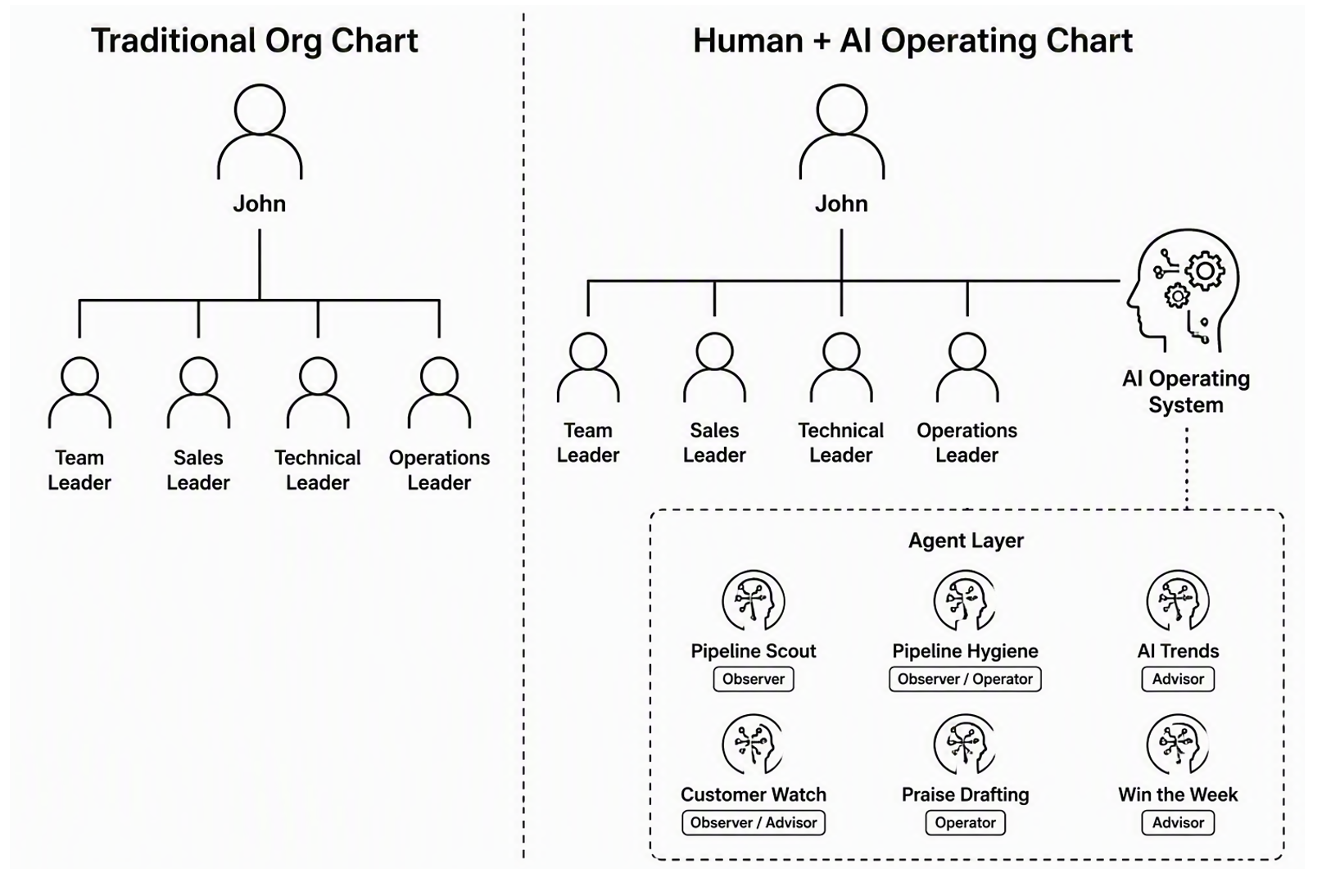
Evolving org chart
None of this is groundbreaking, but it works. These agents save me several hours each week, help my teams stay on top of the right things, and give us better clarity across the business. I built them using a mix of Microsoft Cowork, Scout and the GitHub Copilot SDK, and I will continue adding to the group as useful scenarios come up.
I do not use AI everywhere, though. For example, I do not use AI to manage my entire calendar or inbox extensively. Both depend heavily on personal context, and my current approach works for me. The goal is not to use AI everywhere, but to use it where it genuinely helps and to make its role, authority, and human accountability as clear as any reporting line on the org chart.